Modernizing high-volume event management
How might we move a manual event registration system completely online?
Golden Nugget Las Vegas' biggest events were being held back by outdated tools and processes
Interviews with Golden Nugget Las Vegas' Executive Director of Marketing Operations and Special Events Manager revealed the two main components of their event management workflow
Tracking guest data
Staff relied on a single Excel sheet to log guest information such as names, seat counts, and registration status.
Because the spreadsheet was so dense, it was difficult to quickly discern details at a glance.
Tracking guest seating
Staff used a 5-foot-tall whiteboard to plan table layouts and assign seats on event day.
While guests found it entertaining, working on such a large physical board was cumbersome for staff and contributed to long registration lines.
Using the insights surfaced from user research, I translated user needs into a clear set of product features.
Capacity snapshot
Quick visibility into guest counts at each registration stage (no table → reserved seats → claimed seats)
Registration statuses
Clear identification of each guest's place in the registration flow
Seating chart
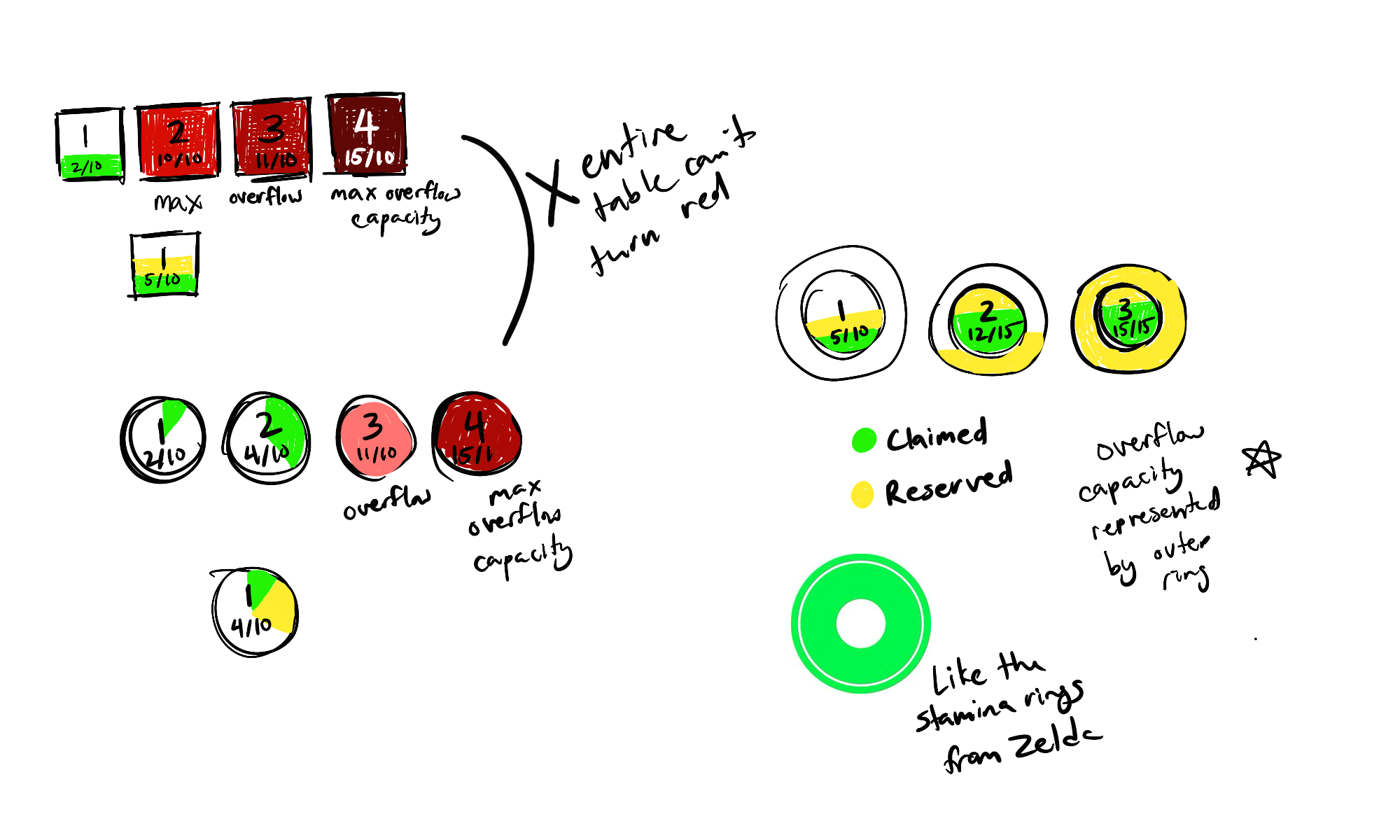
Digital tabling diagrams capable of showing when tables exceeded their intended capacity (it wasn't uncommon for extra seats to be pulled over)
Early explorations of the tabling system were really frustrating
My first instinct was to have tables change color as they approached and exceeded maximum capacity. However, that conflicted with the need to reserve color for registration statuses so they remained easily scannable, even in a tabling view.